
Free FrostyStack guide
Getting Started with Soro
A practical guide to automated SEO content for small and local business owners. No SEO background needed.
- Finds keywords
- Writes articles daily
- Publishes to your site
Plans from $39/month with a 14-day money-back guarantee.
Or just read the full guide below. If the PDF does not open inside Instagram, TikTok, or Facebook, tap the ⋯ menu and choose Open in browser.
Contents (13 sections)
- What Soro Is (and What It Is Not)
- Before You Start
- Creating Your Account and Touring the Dashboard
- Brand DNA: Business Type, Voice, and Audience
- Keywords and the Content Calendar
- Articles: The Daily Workflow
- Connecting Your Website
- Draft Mode vs. Auto-Publish
- Measuring Results
- Best Practices and Common Mistakes
- What Soro Doesn’t Do (and What to Pair It With)
- Quick-Reference Checklist
- Frequently Asked Questions
How to use this guide
If you are brand new, read Sections 1 through 8 in order before you leave auto-publishing on. Sections 9 through 11 cover the months that follow, and Section 12 is a checklist you can tick off right here or print from the PDF.
Screenshots come from a live Soro account (October 2026). Soro updates its interface often, so your screens may look slightly different.
Section 1
What Soro Is (and What It Is Not)
Soro is an AI tool that writes helpful articles for your website and publishes them on a schedule, so more people find your business through Google and AI assistants like ChatGPT.
Most small business owners know they should be publishing helpful content on their website. Few have the time. Soro takes that job off your plate. You give it your website address, it studies your business, and then it plans, writes, and (if you allow it) publishes articles for you, typically one per day.
The articles are built around keywords: the words and phrases people type into Google when they need something. When a homeowner searches “why is my water heater making noise,” a plumber with a clear, useful article on that exact question has a chance to appear in the results, earn a click, and eventually earn a call.
What Soro does for you
- Learns your business. It scans your site to understand your services, audience, niche, and the way you write.
- Finds topics worth writing about. It researches keywords automatically and fills a content calendar.
- Researches before it writes. For each topic it looks at what currently ranks, then writes a long-form article with headings, images, links, a title tag, and a meta description.
- Mentions your business naturally. Articles point readers toward your services where it fits.
- Publishes to your website. It connects to WordPress, Shopify, Wix, Webflow, Ghost, HubSpot, Notion, and Next.js, with webhooks for other setups.
What Soro is not
- Not instant. Search traffic builds slowly. Expect roughly 3 to 6 months before results are meaningful, and often longer in competitive markets.
- Not a complete SEO program. Soro is a content engine first. It does not build backlinks (see Section 11).
- Not a substitute for your judgment. AI can get facts, prices, and local details wrong. You are still the editor-in-chief of your website.
A few terms you will see
| Term | Plain-English meaning |
|---|---|
| SEO | Search engine optimization: making your site easier for Google and AI tools to find, understand, and recommend. |
| Keyword | A word or phrase people search for, like “emergency plumber Encinitas”. |
| Long-tail keyword | A longer, more specific search. Fewer searches, but easier to rank for and often closer to a buying decision. |
| CMS | Content management system: the platform your website runs on (WordPress, Wix, Shopify, and so on). |
| Meta description | The short summary that often appears under your page title in Google results. |
Ready to put your blog on autopilot?
Plans start at $39/month with a 14-day money-back guarantee, so you can test Soro on your own site.
Start with SoroSection 2
Before You Start
Fifteen minutes of preparation saves hours of cleanup later. Work through this checklist before you sign up.
Tip: Have a few strong pages first
If your site has only a homepage, write a short About page and one page per main service before you start. Soro gets better material to learn your voice from, and early articles need less editing.
Watch out: Regulated fields need extra care
If you work in legal, medical, dental, financial, or similar fields, every article should be reviewed by a qualified person before publishing.
Section 3
Creating Your Account and Touring the Dashboard
Signing up takes a few minutes. Soro launches a setup wizard that walks you through adding your website. Budget 20 to 30 minutes so you can review its work carefully.
Step by step
- Sign up at trysoro.com and choose a plan. Plans start at $39 per month and differ mainly in how many articles you get (from 30 per month up to unlimited). No contract; 14-day money-back guarantee.
- Enter your website address when the wizard asks. Use your main domain (https://yourbusiness.com).
- Let Soro scan your site. It reads your pages to learn what you sell, who you serve, your niche, your competitors, and your writing style.
- Review what it learned. Soro fills in your Brand DNA: business type, brand voice and tone, and audience. Section 4 explains how to sharpen it.
- Choose your content language. English is the default; more than 50 languages are supported.
- Land on your Dashboard. Soro starts filling your calendar right away.
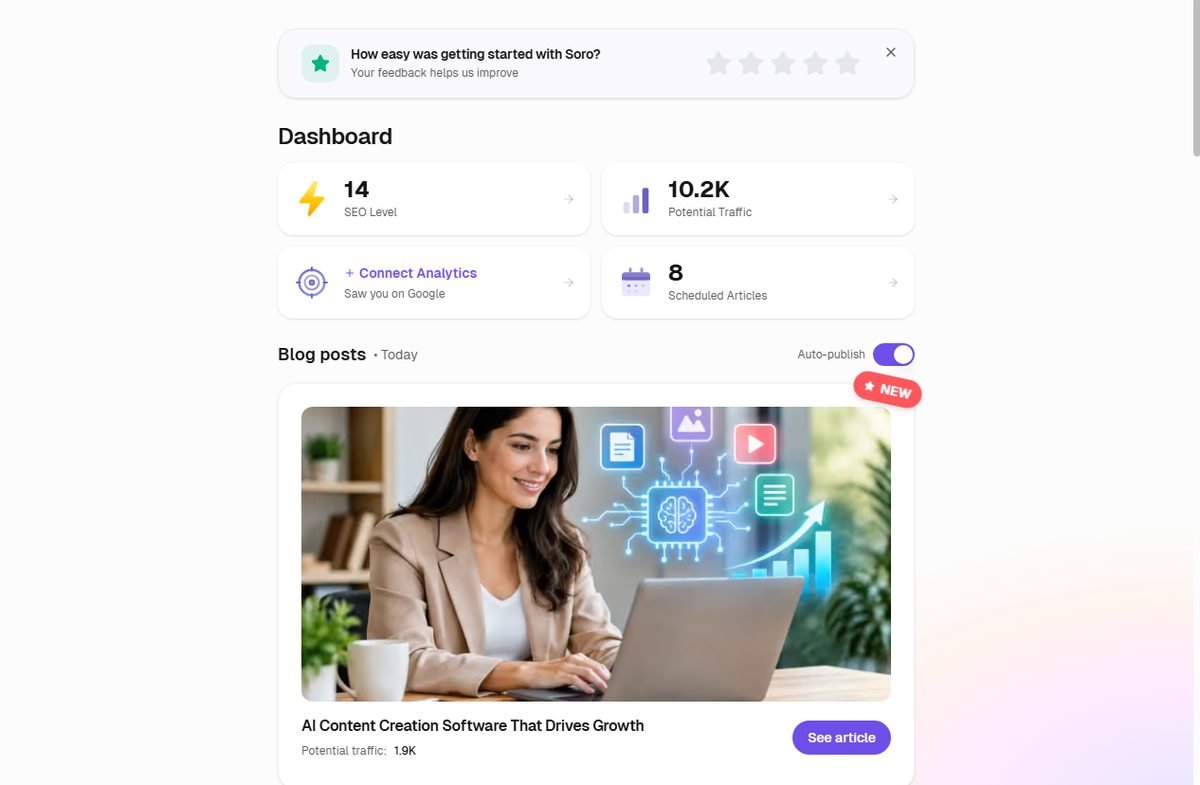
What you see on the Dashboard
| Card | What it tells you |
|---|---|
| SEO Level | Soro’s overall score for your site’s SEO progress. Watch the trend, not the number. |
| Potential Traffic | Soro’s estimate of monthly visits your keywords could bring. It is a projection, not actual visitors. |
| Connect Analytics | Links your Google data so Soro can show how often you actually appear in search. Do this on day one. |
| Scheduled Articles | How many articles are queued on your calendar. |
| Blog posts | Today’s article, with a See article button to open it. |
The sidebar menu
| Menu item | What it is for |
|---|---|
| Home | The Dashboard above. |
| Brand DNA | Your business type, voice, audience, and language (Section 4). |
| Calendar | Every scheduled and published article (Section 5). The badge shows how many are queued. |
| Articles | All your articles, for reading and editing (Section 6). |
| Social Media, Google Business | Newer features for extending your content beyond your blog (Section 11). |
| Analytics, Keywords, Site Speed | Insights: search performance, the keywords Soro is targeting, and a speed score for your site. |
| Settings | Account, billing, and Integrations, where you connect your website (Section 7). |
| Get Help 24/7, Add more websites | Support chat, and adding additional sites to your account. |
Section 4
Brand DNA: Business Type, Voice, and Audience
Brand DNA is where Soro stores what it knows about your business. Every article is written from it, so this page deserves more of your attention than any other.

When you add your website, Soro’s AI fills in Brand DNA for you by reading your site. The page includes your Content Language, a Business Type description, and your Brand Voice & Tone, with audience details further down. Click Edit next to any section to change it. The bar at the top (“Soro improves with every piece created”) rises as Soro writes more and learns from your edits.
Treat the auto-fill as a first draft
Auto-fill can only see what is on your website. It does not know which services are most profitable, which customers you would rather avoid, or what makes you different. Sharpen it:
- Make it specific. Replace “quality service” with “same-day repairs, upfront flat-rate pricing”.
- Add your service area if it is missing. Local businesses win on local searches.
- Remove services you no longer offer or do not want more of.
- Add what makes you different: years in business, certifications, guarantees, specialties.
Tip: Brand DNA accepts instructions, not just descriptions
In the example above, the owner added a line to Business Type naming the specific products the articles should focus on, plus a request for some in-depth reviews. Soro’s calendar then filled with those topics (see the next section). Use this to point Soro at your most profitable services.
Weak vs. good: a plumber’s example
| Weak (too generic) | Good (specific and usable) | |
|---|---|---|
| Voice | Professional, friendly, and helpful. | Plain-spoken and practical, like a trusted neighbor who happens to be an expert. Short sentences. Explain the “why”. Never talk down to homeowners. Avoid jargon unless we define it. |
| Audience | Homeowners who need plumbing. | Homeowners aged 35 to 70 in North County San Diego, mostly in older single-family homes. They contact us during a problem and care about fast response, honest pricing, and not being upsold. |
Section 5
Keywords and the Content Calendar
Soro decides what to write by researching keywords and arranging them on a calendar. Your job is to make sure that calendar points at business you actually want.
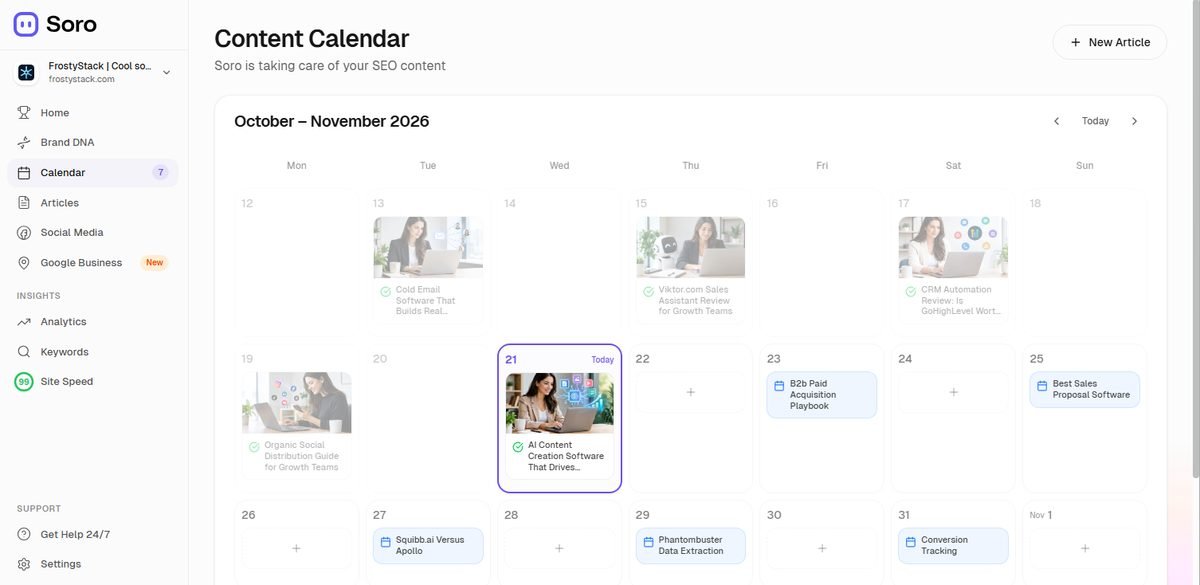
Reading the calendar
- Published articles show an image and a green check mark. Click one to open it.
- Scheduled articles show a calendar icon and title. Click to preview or change.
- Empty days show a + button so you can add an article for that day. Days further out display “Soro auto-fills this day”, meaning Soro will choose a topic when the time comes.
- New Article (top right) lets you request an article on a topic you choose.
- Use the arrows and Today to move between weeks.
How Soro picks topics
Soro favors long-tail topics (specific questions with less competition) and buyer-intent topics (searches that suggest someone is ready to hire or buy). You can see what it is targeting on the Keywords page in the sidebar. A small business is unlikely to outrank national brands for “plumber” in year one, but has a real chance on “cost to replace a water heater in Encinitas”.
Steering toward revenue
Review upcoming topics once a week. For each, ask: would this searcher plausibly become my customer? Do I offer this, in an area I serve? Is it too similar to something already scheduled or published? Then:
- Make high-margin services prominent in Brand DNA so Soro knows they matter.
- Add your own topics with New Article or the + button, especially “how much does…” and “do I need…” questions.
- Keep the bulk of the calendar close to what you sell, with a few broader educational pieces.
Watch out: Watch for topic overlap
Two articles targeting nearly the same search can compete with each other, and neither ranks well. If you see “how to fix a running toilet” and “why does my toilet keep running” both scheduled, keep one.
Section 6
Articles: The Daily Workflow
Each day Soro produces a new article. You can review it, edit it, or let it publish automatically.
What a Soro article includes
Before writing, Soro researches what currently ranks for the topic and builds an outline to cover it well. A finished article typically includes a headline, a structured body with headings, AI-generated images (and sometimes video embeds), internal and external links, a title tag and meta description, and natural mentions of your business. Open today’s article from the Dashboard (See article), the Calendar, or Articles.
A simple 10-minute review routine
- Read the headline and first paragraph. Do they answer the searcher’s question?
- Skim the headings. Is anything missing that you would tell a customer?
- Check the facts using the table below.
- Read the business mentions. Do they describe you accurately and naturally?
- Check the images. AI images can show unrealistic equipment or odd details. Replace anything that looks wrong.
- Approve, edit, or reject.
If you keep making the same edit (too formal, too salesy, wrong service area), fix the cause in Brand DNA. Future articles improve and your review time shrinks.
| Check | Why it matters |
|---|---|
| Facts and how-to steps | AI can state wrong things confidently. Unsafe instructions are a real liability. |
| Prices and costs | AI price ranges may not match your market. Use your real numbers or general ranges. |
| Claims and guarantees | Make sure nothing promises what you do not offer (24/7 service, licenses, warranties). |
| Local details | Check city names, neighborhoods, regulations, permits, and climate references. |
| Tone | If it does not sound like you, refine Brand Voice & Tone rather than rewriting every article. |
| Links | Outside links should point to reputable sources, never to competitors. |
Section 7
Connecting Your Website
Soro can publish straight to your site, so you never copy and paste. WordPress uses a free plugin; other platforms connect from Soro’s Settings.
WordPress: full walkthrough
The plugin is called Soro - SEO Autopilot & AI Content Writer. You need WordPress 5.0 or later.
- In your WordPress admin, go to Plugins > Add New.
- Search for “Soro SEO”, then click Install Now and Activate.
- In WordPress, go to Settings > Soro and copy your API key.
- In Soro, go to Settings > Integrations > WordPress and paste the key.
- Choose the WordPress author and category Soro should use for its posts.
- Confirm the connection. Soro will publish according to your schedule.
Good to know
- If you use Yoast SEO, Rank Math, or All in One SEO, the plugin fills in each article’s meta description and focus keyword automatically.
- Soro posts are standard WordPress posts, so they work with your theme and page builder.
- Create a dedicated category (for example, “Tips and Guides”) so Soro posts are easy to find.
Watch out: Treat your API key like a password
Anyone with it could post to your site through Soro. Never paste it into emails or chats.
Shopify
Install Soro from the Shopify App Store in your Shopify admin and follow the prompts to connect your store’s blog. Users report that after approving an article in Soro, they are asked whether to publish it to Shopify. Billing may be handled through Shopify.
Wix, Webflow, Ghost, HubSpot, Notion, Next.js, and webhooks
Find these under Settings in Soro’s integrations area. You will usually sign in to the platform and authorize Soro, or paste in a key. For custom-built sites, Soro offers webhooks, which send each finished article to an address your developer sets up. If you cannot connect at all, you can still copy articles out of Soro and paste them into your site manually.
Section 8
Draft Mode vs. Auto-Publish
Auto-publish is Soro’s headline feature: content that goes live while you sleep. Earn your way there.
The Auto-publish toggle sits on the Dashboard, next to Blog posts (see the screenshot in Section 3). When it is on, articles go live on schedule. When it is off, articles wait for you to review and publish them. Check it on day one: it may already be switched on in a new account.
| Auto-publish OFF (review first) | Auto-publish ON | |
|---|---|---|
| Time required | About 5 to 15 minutes per article. | Close to zero day to day. |
| Risk | Low. You catch errors before customers see them. | Higher. Mistakes go live and may sit unnoticed. |
| Best for | New accounts, regulated industries, anyone still tuning Brand DNA. | Established accounts where recent articles needed little or no editing. |
Our recommendation
Keep Auto-publish off for roughly your first 30 articles, about a month. That gives you enough samples to spot patterns, tune Brand DNA, and build confidence. Switch it on when:
- Your last 10 or so articles needed only minor edits, or none.
- You have not caught a factual or pricing error in a while.
- The voice consistently sounds like your business, and the calendar is free of off-target topics.
- You are not in a regulated field (if you are, keep reviewing every article).
Tip: Even on auto-publish, spot-check weekly
Set a 15-minute weekly reminder to read two or three recent articles. Catching quality drift early is far easier than cleaning up dozens of posts later.
Section 9
Measuring Results
Soro’s Dashboard and Analytics give you a quick read. Google Search Console is the full picture. Learn three numbers and one habit.
First, click Connect Analytics on the Dashboard so Soro can show real search data instead of estimates. Remember that Potential Traffic is a projection; actual results show up in Analytics and Search Console.
| Metric | What it means | What to look for |
|---|---|---|
| Impressions | How often your pages appeared in Google results. | Rises first, often within two to three months. Your earliest sign of progress. |
| Clicks | How often someone clicked through to your site. | Follows impressions with a lag. |
| Average position | Where your pages typically rank (1 is the top). | Pages moving from the 30s to the teens to single digits. |
The monthly habit: find your near-winners
Once a month, open Search Console’s Performance report and look at your pages. Find articles ranking in positions 6 to 15. They are on or near page one, and small improvements can push them up where most clicks happen. For each, add a section answering a related customer question, add your real experience or a photo of your work, strengthen the call to action, and link to it from your service pages.
A realistic timeline
| When | What typically happens |
|---|---|
| Month 1 | Setup, reviewing articles, tuning Brand DNA and the calendar. Little or no search traffic yet. Normal. |
| Months 2 to 3 | Google indexes your articles. Impressions start to climb. A few clicks trickle in. |
| Months 4 to 6 | Some long-tail articles reach page one. Clicks become noticeable; possibly first leads from articles. |
| Months 6 to 12 | Growth compounds as articles mature and support each other through internal links. |
Timelines vary with your industry, competition, site age, and content quality. Be skeptical of any promise of results within weeks, including testimonials in marketing materials.
Section 10
Best Practices and Common Mistakes
Most disappointing results with automated content come from the same handful of mistakes.
Best practices
- Invest in Brand DNA. A specific, well-written profile is the single biggest lever on quality.
- Add what only you know. A sentence of real experience, a real photo, or your actual pricing makes an article more trustworthy than anything AI produces alone.
- Keep topics close to revenue. Traffic that never becomes customers is a vanity number.
- Link articles to your service pages and make sure every article tells readers how to contact you.
- Review on a schedule, even after switching on Auto-publish.
- Give it time. Judge results at six months, not six weeks.
Common mistakes
| Mistake | What happens | How to avoid it |
|---|---|---|
| Thin or generic content | Articles read like every other AI article and do not rank or convert. | Sharpen Brand DNA; add personal details during review. |
| Duplicate topics | Similar articles compete with each other. | Review the calendar weekly; scan for overlaps at 30 articles. |
| Never reviewing output | Errors or off-brand claims go live under your name. | Keep Auto-publish off at first; spot-check weekly after. |
| Expecting results in weeks | Owners cancel just before content starts to work. | Use the Section 9 timeline; watch impressions. |
| Writing about the wrong services | Traffic arrives for work you do not want. | Name profitable services in Brand DNA; prune the calendar. |
| Ignoring the rest of SEO | Good content held back by no reputation or a slow site. | See Section 11. |
Section 11
What Soro Doesn’t Do (and What to Pair It With)
Soro is a content engine. Content is one important ingredient in being found online, but not the only one.
| Area | In Soro? | What to do |
|---|---|---|
| Blog content | Yes, core feature | Covered throughout this guide. |
| Google Business Profile | Partly (new Google Business section) | For local businesses this often drives the most calls. Explore Soro’s section, and still keep your profile complete with photos, updates, and replies to reviews. |
| Social media | Partly (Social Media section) | Check what your plan includes; review posts like articles. |
| Site speed | Partly (Site Speed score) | Use the score as a warning light; ask your developer to fix real problems. |
| Customer reviews | No | Ask happy customers for Google reviews consistently. A text after each job works well. |
| Backlinks (other sites linking to you) | No | Earn links from local directories, your chamber of commerce, suppliers, partners, sponsorships, and local news. |
| Core service pages | Not the focus | Give each main service a strong, human-written page that articles can link to. |
Tip: The local service formula
For most local businesses the strongest combination is a complete Google Business Profile, a steady flow of reviews, solid service pages, and consistent helpful content. Soro covers the content so you have time for the rest.
Looking for tools that cover the other pieces? FrostyStack reviews software for CRM, outreach, content, and growth. Browse the tools.
Section 12
Quick-Reference Checklist
Tick items off as you go. The PDF version has a printable page.
Setup (week 1)
Weekly (first month)
Monthly (ongoing)
Section 13
Frequently Asked Questions
Quick answers to the questions people ask most.
Do I need to know anything about SEO?
No. Soro handles the technical parts. You bring knowledge of your business and the judgment to catch errors.
How much does Soro cost?
Plans start at $39 per month; higher plans include more articles, from 30 per month up to unlimited. Prices and promotions change, so check current Soro pricing for details.
Is there a contract? Can I get a refund?
No long-term contract; cancel anytime. Soro offers a 14-day money-back guarantee. If you subscribed through Shopify, cancel in your Shopify admin.
How long until I see results?
Typically 3 to 6 months for meaningful traffic, sometimes longer. Impressions rise first. See Section 9.
Will the articles sound like me?
Soro learns from your website and Brand DNA. Early articles usually need some editing; the more specific your Brand DNA, the closer it gets.
Will Google penalize AI-written content?
Google’s stated position is that it rewards helpful, people-first content however it is produced, and acts against low-value content made mainly to manipulate rankings. That is why review and your own expertise matter.
Can I choose my own article topics?
Yes. Use New Article on the Calendar, or click + on any empty day. You can also steer topics through Brand DNA.
Does it work if my site is not on WordPress?
Soro lists integrations for Shopify, Wix, Webflow, Ghost, HubSpot, Notion, and Next.js, plus webhooks. You can also copy articles out manually.
Can I run more than one website?
Yes. Use Add more websites in the sidebar; each site has its own Brand DNA and calendar.
Who do I contact for help?
Use Get Help 24/7 in the sidebar or email info@trysoro.com. For problems on your own site (plugins, hosting, theme conflicts), your web developer or host may also need to help.
Start growing your organic traffic
Set up Soro in minutes, review your first articles, and let your content compound month after month.
Some links on this page are affiliate links. If you sign up through one of them, FrostyStack may earn a commission at no additional cost to you. This guide is independent and was not created or endorsed by Soro or Digimeri OÜ. Product details verified October 2026; features and pricing may change. Affiliate disclosure