
Free FrostyStack guide
Getting Started with Squibb
Find leads, write sequences, and send cold email without buying domains or warming inboxes.
- Leads
- Sequences
- Sending
- Inbox
- Claude MCP
Plans from $30/month. Starter includes a 30-day free trial.
Or just read the full guide below. If the PDF does not open inside Instagram, TikTok, or Facebook, tap the ⋯ menu and choose Open in browser.
Contents (15 sections)
- What Squibb Is (and What It Is Not)
- Plans, Credits, and the Free Trial
- Before You Send: The Legal and Practical Basics
- A Tour of the App
- Finding and Managing Leads
- Creating and Launching a Campaign
- Writing Emails That Get Replies
- Handling Replies in the Inbox
- Domains and Deliverability
- Agent Mode (Optional Add-On)
- Running Squibb from Claude (MCP)
- Measuring and Improving Results
- Common Mistakes to Avoid
- Quick-Reference Checklist
- Frequently Asked Questions
How to use this guide
Read Sections 1 to 3 before sending anything: what Squibb does, how credits work, and the cold email basics. Sections 4 to 9 walk through the app; 10 and 11 cover Agent Mode and running Squibb from Claude.
Screenshots are from a live account in October 2026.
Section 1
What Squibb Is (and What It Is Not)
Squibb is a cold email platform with the sending infrastructure built in. You bring an audience (or let Squibb find one), approve the emails, and it sends them for you.
Traditional cold email is a technical project before it is a sales project. You buy extra domains, create inboxes, configure DNS records, wait weeks for the inboxes to warm up, and then monitor deliverability so your emails do not land in spam. Squibb removes that whole layer: emails go out through Squibb’s own sending domains, which Squibb sets up, warms, and maintains. You can be sending the same day you sign up.
The workflow in three steps
| Step | What happens | Where in this guide |
|---|---|---|
| 1. Leads | Find prospects with Squibb Leads, upload a CSV, or connect a lead provider such as Apollo, Hunter.io, or Clay. Squibb verifies every email address before sending. | Section 5 |
| 2. Sequence | Write a short series of emails yourself, or have one of Squibb’s two free writing agents (Jett or Sable) draft it from your brief. You review and edit before launch. | Sections 6 and 7 |
| 3. Send and follow up | Squibb sends on a schedule, stops following up with anyone who replies or unsubscribes, and collects replies in its Inbox. | Sections 6 and 8 |
What Squibb is not
- Not a guarantee of customers. Squibb gets your emails out; your targeting and your offer decide whether anyone replies. Squibb’s own terms make no promises about inbox placement, replies, or sales.
- Not for consumers. It is built for business-to-business outreach. Purchased consumer lists are banned.
- Not hands-off legally. Emails go out in your name, and you are responsible for what they say and who receives them (Section 3).
- Not LinkedIn or calendar automation. Squibb is focused on email. Booking meetings happens in your own replies and calendar tool.
Ready to launch your first outbound campaign?
Starter is $30/month with a 30-day free trial, and you can be sending the same day.
Try SquibbSection 2
Plans, Credits, and the Free Trial
Squibb runs on credits. Understanding the credit math up front is the difference between a month of steady outreach and an account that pauses in week one.
| Plan | Price | Credits per month | Notable extras |
|---|---|---|---|
| Starter | $30/month | 5,000 | 2 forwarding inboxes for replies; email support; 30-day free trial |
| Growth | $73/month | 15,000 | 5 forwarding inboxes; 1 connected Gmail or Outlook mailbox; priority support |
| Pro | $210/month | 50,000 | 10 forwarding inboxes; 3 connected mailboxes; priority support |
All plans include Squibb’s sending infrastructure, AI sequence writing, CSV uploads, lead-source integrations, reporting, and the Squibb Inbox. Prices were current in October 2026; check Squibb’s pricing for today’s offers.
How credits are spent
| Action | Cost |
|---|---|
| Each campaign email sent | 1 credit |
| Each lead found by Squibb Leads | 10 credits |
| Leads you upload as a CSV | No credits |
| Leads from a connected provider (Apollo, Hunter.io, and so on) | No Squibb credits (billed by that provider) |
Worked example: one month on Starter
Find 300 prospects with Squibb Leads: 300 × 10 = 3,000 credits. Send them a 3-step sequence: 300 × 3 = up to 900 credits (less if people reply or unsubscribe, because their sequence stops). Total: about 3,900 of your 5,000 credits.
Lesson: lead finding costs ten times more than sending. If you already have a list, uploading it stretches your credits much further.
Rules worth knowing
- Free trial: Starter starts with 30 free days and its full credit allowance. A card is required, and $30 is charged when the trial ends unless you cancel first. Squibb Leads becomes available once the plan is paid (or immediately on Growth and Pro).
- Plan credits expire one month after they are granted; unused ones do not roll over. Purchased top-up credits do not expire but are non-refundable.
- Running out pauses, it does not overcharge. A campaign that runs out of credits holds its place and resumes when your balance covers the next email.
- Auto top-up is optional. If you turn it on, set a daily or monthly spend cap.
- Your current balance and plan show in the top right corner of the app at all times.
Section 3
Before You Send: The Legal and Practical Basics
Cold email to businesses is legal in the United States when you follow a few clear rules. Squibb handles some of them automatically; the rest are on you.
What Squibb does for you
- Adds a working unsubscribe link to every email and processes opt-outs automatically.
- Inserts your physical mailing address into your emails (you must provide a real one in your account).
- Keeps accurate sender and header information, and stops a sequence the moment someone replies or unsubscribes.
- Verifies addresses and maintains a suppression list so opted-out people are not contacted again.
What you are responsible for
- You are the sender. Emails go out in your name, so every claim must be true and the subject line must not mislead.
- Business purposes only. Contact people in their professional role about something relevant to their work.
- Lawful lists only. Never upload purchased or scraped consumer lists, or people who have opted out from you.
- Know the rules where you send. Squibb’s terms name CAN-SPAM (US), GDPR and UK GDPR/PECR (Europe and UK), and CASL (Canada). Europe and Canada are stricter than the US about unsolicited email.
- No prohibited offers, including adult content, weapons, unlicensed gambling, MLM, and unregistered securities.
Watch out: Squibb protects its shared infrastructure
Because many customers send through the same infrastructure, Squibb monitors bounce and complaint rates and can throttle, pause, or suspend accounts that hurt deliverability. Clean lists and relevant emails keep your account healthy. This guide is not legal advice; check with a professional if you are unsure.
Have these ready
Section 4
A Tour of the App
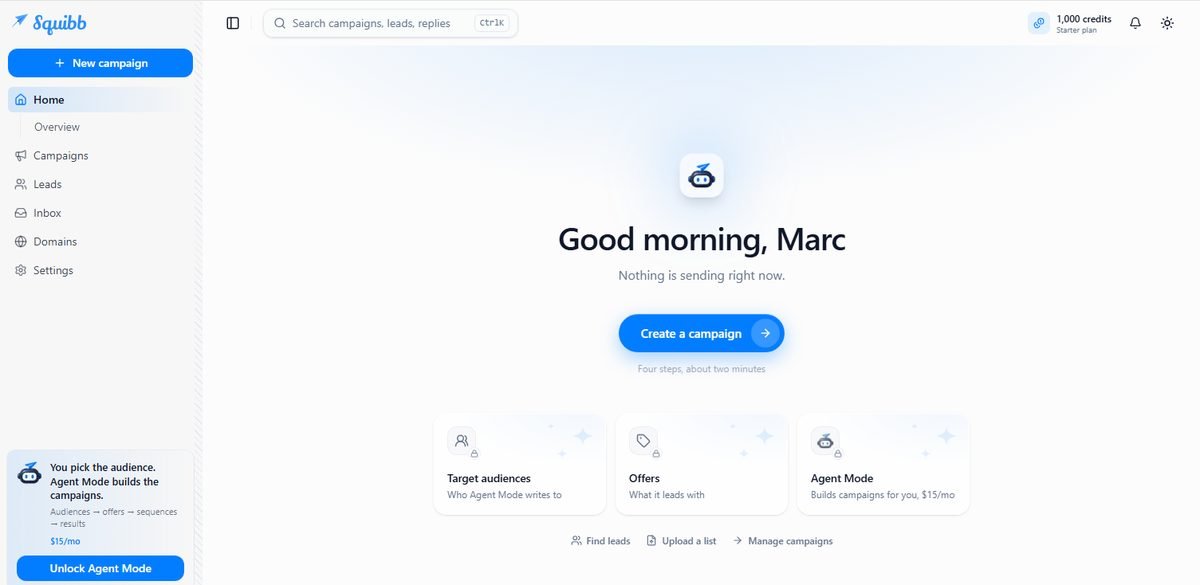
Squibb’s interface is clean and simple. Everything lives in the left sidebar, with your credit balance always visible at the top right.
| Item | What it is for |
|---|---|
| New campaign (blue button) | Starts the campaign builder from anywhere in the app. |
| Home / Overview | A summary of what is sending, plus shortcuts to create a campaign, find leads, or upload a list. Squibb says a campaign takes four steps and about two minutes. |
| Campaigns | Every campaign with its status, leads, steps, and results (Section 6). |
| Leads | All your contacts, lists, and segments (Section 5). |
| Inbox | Replies from prospects, and where you answer them (Section 8). |
| Domains | Optional: buy your own sending domain through Squibb (Section 9). |
| Settings | Account, mailing address, connected mailboxes, integrations, and billing. |
| Search bar (Ctrl K) | Jump to any campaign, lead, or reply. |
| Credits (top right) | Your balance and current plan. |
| Help & Support and the chat bubble | In-app help and support chat. |
The Home screen also shows locked cards for Target audiences, Offers, and Agent Mode, and the sidebar promotes Agent Mode. These belong to the optional $15/month Agent Mode add-on (Section 10). You do not need it to run campaigns.
Section 5
Finding and Managing Leads
Your results depend more on who you email than on anything else. The Leads page is where you build and check that audience.
Three ways to add leads
| Method | How | Credit cost |
|---|---|---|
| Find leads (Squibb Leads) | Describe who you want in plain English. Squibb searches for matching companies and people and verifies their emails. | 10 credits per lead |
| Import CSV | Upload a spreadsheet of contacts you are legally allowed to email. | Free |
| Connected provider | Link Apollo, Hunter.io, Clay, or a similar provider and pull leads from it. | Billed by the provider |
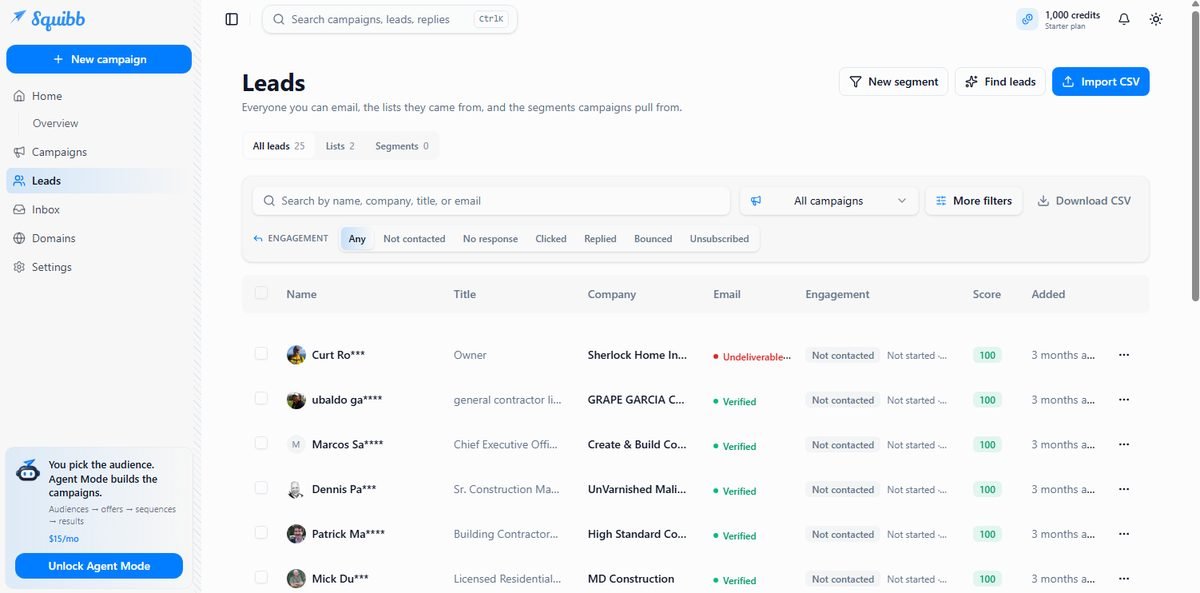
Reading the Leads table
- Email status: Verified addresses are safe to send to. Undeliverable ones are skipped; do not try to work around this, because bounces damage deliverability.
- Engagement: filter by Not contacted, No response, Clicked, Replied, Bounced, or Unsubscribed. These filters become your follow-up lists later.
- Score: Squibb’s rating of how well a lead matches. Higher is better.
- Lists and Segments: lists are where leads came from; segments are saved filters that campaigns pull from. Use New segment to group, for example, all verified owners in one state.
- Download CSV exports your leads at any time.
Tip: Start small and specific
Your first Squibb Leads search should be narrow, around 50 to 100 people, so you can check the quality before spending more. Review the job titles and companies: if they are not who you would want to call, refine the description rather than emailing them anyway.
Section 6
Creating and Launching a Campaign
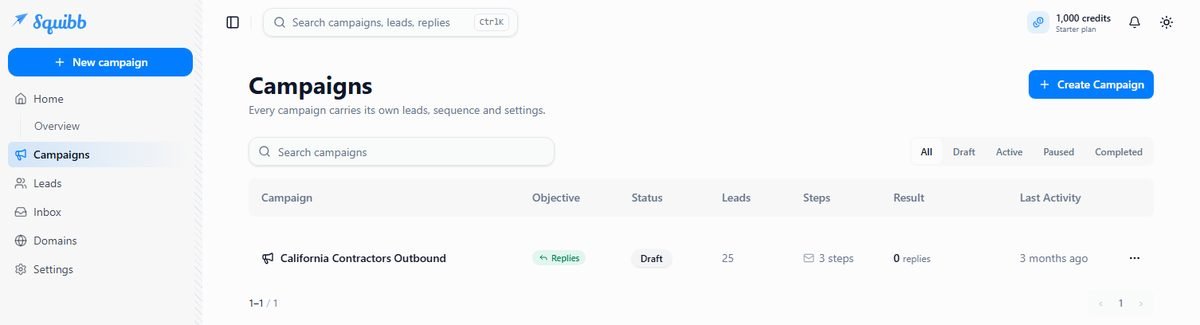
A campaign bundles three things: who you email, what you send, and how it is scheduled. Every campaign carries its own leads, sequence, and settings.
Building the campaign
Click New campaign in the sidebar or Create Campaign on the Campaigns page. The builder walks you through a few short steps. The exact screens evolve, but you will make these decisions:
- Choose an objective. Replies campaigns aim for conversations; Traffic campaigns send prospects to your website, landing page, or product link and track clicks.
- Pick your audience: a list or segment from the Leads page.
- Create the sequence: write the emails yourself, or have Jett or Sable draft them from a short brief about your business, audience, and offer. A typical sequence is 3 steps: a first email and two follow-ups a few days apart.
- Review every email. Read each step as if you were the recipient. Fix anything inaccurate, generic, or pushy (Section 7 has a checklist).
- Check settings and launch. Until you launch, the campaign stays a Draft.
Campaign statuses and controls
| Status | Meaning |
|---|---|
| Draft | Built but not sending. Safe to edit. |
| Active | Sending on schedule. |
| Paused | Everything holds in place. When you resume, follow-ups shift forward by the time spent paused. |
| Completed | Every lead has finished the sequence. |
The Campaigns table shows each campaign’s objective, status, number of leads, number of steps, results, and last activity. Use the three-dot menu on a row for more actions.
Section 7
Writing Emails That Get Replies
The AI agents write a decent first draft. Your edits are what make it sound like a person worth answering.
The rules of good cold email
- Short. 50 to 120 words. If it does not fit on a phone screen, cut it.
- About them, not you. Lead with a problem they have, not your company history.
- One ask. A single, low-effort next step: “Worth a quick chat?” beats a calendar link and three questions.
- Specific proof. One concrete result or example beats a list of adjectives.
- Plain and honest subject lines. No fake “Re:” or “Fwd:”, no clickbait. Misleading subjects are illegal under CAN-SPAM and wreck trust.
- Follow-ups add something. Each follow-up should offer a new angle, example, or question, not “just bumping this.”
Example 3-step sequence
For a bookkeeping firm emailing residential contractors:
Step 1
Subject: Job costing for {Company}
Hi {FirstName}, most contractors I talk to know their revenue but not which jobs actually made money. We set up simple job costing for residential builders so you see profit per project every month.
Worth a 15-minute call to see if it fits {Company}?
Step 2 (3 days later)
Quick example: a 12-person remodeling firm in San Diego found two job types losing money once they tracked costs by project. Happy to share how they set it up.
Step 3 (4 days later)
Should I close the loop on this, {FirstName}? If job costing is not a priority right now, no worries at all.
Tip: Edit the AI draft for these four things
Facts about your business (prices, results, guarantees), anything that sounds like a generic template, any claim you could not back up if asked, and personalization tokens that might fail (a missing first name reads badly). Send yourself a test before launching if the builder offers it.
Section 8
Handling Replies in the Inbox
Replies are the whole point. Squibb collects them so nothing gets lost, and stops the sequence for anyone who answers.
- Squibb Inbox: every reply lands here, grouped by campaign. You can read, reply, and ask Squibb to draft a response, which you approve before it is sent.
- Forwarding inboxes: have replies forwarded to your normal email (2 addresses on Starter, 5 on Growth, 10 on Pro).
- Connected mailboxes (Growth and Pro): connect a Gmail or Outlook account to receive replies and send your answers from it. Connected mailboxes never send the campaign emails themselves.
Tip: Speed wins
Reply to interested prospects within a few hours if you can. Interest fades fast. Turn on notifications and check the Inbox at least twice a day while a campaign is active.
Not every reply is a yes. Answer polite “not now” replies politely, and treat “remove me” as an unsubscribe. Squibb stops the sequence automatically either way.
Section 9
Domains and Deliverability
By default, your emails go out through Squibb-managed sending domains. That is what makes same-day sending possible.
Squibb handles the technical setup, warm-up, and reputation of its sending domains. Because this infrastructure is shared with other customers, Squibb watches every account’s bounce and complaint rates closely.
If you want emails sent from a domain that is yours, the Domains page lets you buy one through Squibb. Squibb registers it, manages the DNS and mailboxes, and starts sending campaign email from it once the mailboxes have warmed up. Expect a waiting period before a new domain is ready.
Keep your deliverability healthy
- Send only to verified addresses, and never re-import bounced or unsubscribed contacts.
- Keep targeting tight. Irrelevant emails get marked as spam, and complaints hurt everyone on shared infrastructure.
- Avoid spam triggers: all-caps, excessive links, attachments, and hype words like “guaranteed” or “free money.”
- Watch the Bounced and Unsubscribed filters on the Leads page. A rising rate means your list or message needs work.
Section 10
Agent Mode (Optional Add-On)
Agent Mode is Squibb’s autopilot for improving a running campaign. It costs $15/month and is switched on per campaign.
Agent Mode does
- Tests several versions of the campaign’s sequence against each other
- Retires the weaker versions and writes new ones
- Adds more prospects to the campaign
- Stays within a credit limit you set for that campaign
Agent Mode does not
- Read, draft, or send replies to prospects
- Create or start new campaigns on its own
- Schedule meetings
- Work outside the campaign it is switched on for
When you switch it on, you authorize Squibb to write and send new versions without approving each email. That makes the credit limit the most important setting: start low, review the versions it writes every few days, and raise the limit only when you like what you see. You can pause it or switch it off at any time; the campaign keeps sending the sequences it already has.
Tip: When Agent Mode is worth it
Once you have a campaign that works and you want to scale it or squeeze out better reply rates without rewriting emails yourself. For your first campaign, learn the basics manually first.
Section 11
Running Squibb from Claude (MCP)
Squibb’s official MCP connector lets you manage leads, campaigns, and replies by chatting with Claude in plain English. No API key, nothing to install.
MCP (Model Context Protocol) is an open standard that lets an AI assistant use outside tools. Squibb’s connector works in the Claude app, on claude.ai, and on mobile, on Claude’s Free, Pro, Max, Team, and Enterprise plans. The same link also works in ChatGPT, Perplexity, and Le Chat.
Set it up in Claude (about a minute)
- In Claude, go to Settings > Connectors and click Add custom connector.
- Name it Squibb and paste this URL, then click Add:
https://app.squibb.ai/api/mcp - Click Connect. A Squibb sign-in window opens; approve access and it closes on its own.
- In a chat, click the + button, choose Connectors, and switch Squibb on.
- Test it: “Squibb, how many leads do I have?”
You need an active Squibb workspace first. Already a customer? The MCP page inside the app at app.squibb.ai/mcp has the same link.
Things you can ask for
| You say | Squibb does |
|---|---|
| “Find 100 owners of residential contracting companies in San Diego County.” | Researches, verifies emails, and saves the list to your workspace. |
| “Write a 3-email sequence for that list and set it up as a draft.” | Builds a complete draft campaign for you to review and launch in Squibb. |
| “Any new replies today? Draft an answer to the pricing question.” | Shows the reply and a draft answer you approve before anything is sent. |
| “How did last week’s campaign do, and how many credits do I have left?” | Reports real numbers from your account. |
Safe by default
Through Claude, nothing is bought or sent without your approval, campaigns are created as drafts until you launch them, and your leads’ email addresses stay inside Squibb. You can disconnect at any time in Claude’s connector settings.
Watch out: Lead searches still cost credits
Asking Claude to “find 500 leads” uses Squibb Leads at 10 credits each, 5,000 credits in one sentence. Ask Claude to tell you the credit cost and confirm with you before any search.
Section 12
Measuring and Improving Results
Judge a campaign after at least 100 to 200 people have received the full sequence; smaller numbers are mostly noise. Then look at three numbers.
| Signal | Where to see it | What it tells you |
|---|---|---|
| Reply rate | Campaigns (Result column); Replied filter on Leads | Whether your audience and offer connect. Low single digits is common for cold email. |
| Clicks | Clicked filter on Leads (Traffic campaigns) | Whether your link and call to action earn attention. |
| Bounces and unsubscribes | Bounced and Unsubscribed filters | List quality and relevance. If these rise, stop and fix the list. |
What to change, in order
- Audience first. If nobody replies, the wrong people are probably getting the email.
- Offer second. Make the result more specific or the next step easier.
- Copy third. Test a new first line or subject line.
Change one thing at a time so you know what worked, or let Agent Mode run the tests for you.
Section 13
Common Mistakes to Avoid
Most disappointing first campaigns trip over the same few things.
| Mistake | Better approach |
|---|---|
| Spending all your credits on Squibb Leads in week one | Start with 50 to 100 leads, check quality, then scale. Upload lists you already have. |
| Launching the AI draft without reading it | Review every step for accuracy and tone before you launch. |
| Targeting “small businesses” | Pick one industry, role, and region per campaign. |
| Long emails with several asks | Under 120 words and one simple question. |
| Ignoring replies for days | Check the Inbox twice a day and forward replies to the email you actually read. |
| Leaving your mailing address blank or fake | Add a real business address in Settings; it is legally required. |
| Turning on Agent Mode with a high credit limit | Start low and review its versions regularly. |
Section 14
Quick-Reference Checklist
Tick items off as you go. The PDF version has a printable page.
Setup
Each campaign
Weekly
Section 15
Frequently Asked Questions
Quick answers to the questions people ask most.
Do I need to buy domains or warm up inboxes?
No. Squibb sends through its own managed infrastructure. Buying your own domain through Squibb is optional.
Do I need my own lead list?
No. Squibb Leads can find prospects for you (10 credits each). If you have a list, uploading it is free.
Does Squibb write the emails?
If you want it to. Two free agents, Jett and Sable, draft sequences from your brief, and you can edit everything. Emails sign off with your name.
Where do replies go?
To the Squibb Inbox and to your forwarding addresses. On Growth and Pro you can also connect a Gmail or Outlook mailbox.
Is there a free trial?
Starter includes 30 free days with its full credits. A card is required; cancel before the trial ends to avoid the $30 charge. See current Squibb plans.
What happens if I run out of credits?
Campaigns pause and resume automatically when credits are available. You are never charged beyond your credits unless you turn on auto top-up.
Can I stop a campaign immediately?
Yes. Pause holds everything in place, and resume picks up where it left off.
Does sending guarantee replies?
No. Results depend on your audience, offer, and copy. Squibb removes the technical work, not the need for a good pitch.
Can I cancel anytime?
Yes, in Settings > Billing. Cancellation takes effect at the end of the billing period.
Start your outbound engine with Squibb
Find leads, write sequences, and send cold email today, with no domains to buy and no inboxes to warm.
Some links on this page are affiliate links. If you sign up through one of them, FrostyStack may earn a commission at no additional cost to you. FrostyStack is an independent affiliate; this guide was not created or endorsed by Squibb or SQUIB LLC. Details verified October 2026 from Squibb’s website, help center, and terms; features and pricing may change. Nothing in this guide is legal advice. Affiliate disclosure